~ $ muxflow --help

Remote-first tmux IDE for coding agents

Agent notifications on desk and phone, voice replies, screenshot paste over SSH, multi-host, ports, files, and Git.

curl -fsSL https://github.com/gal064/muxflow/releases/latest/download/install.sh | bash

MIT·github →

features

  1. 01Remote firstBuilt to work on remote machines over SSH.
  2. 02Mobile appRead an agent's terminal, reply, or hold to talk from your phone. Android today, iOS (coming soon).
  3. 03Agent statusAgent statuses and notifications on both desktop and mobile, for Claude Code and Codex.
  4. 04Multi-hostWorkspaces and agents from several SSH hosts, Linux or macOS, in one sidebar, each marked with its host.
  5. 05Native copy and pastePaste or drag screenshots and files from your laptop into a remote pane. Claude Code and Codex see them as if they were local.
  6. 06PortsSee what is listening on the host and forward a port to your machine with one click.
  7. 07File explorerBrowse, edit and download files on the remote machine, right next to the terminal.
  8. 08Git clientDiff, stage, commit and push without leaving Muxflow.
  9. 09tmux basedYour processes keep running even when you close Muxflow.
  10. 10Open sourceMIT licensed.

in action

Remote first

Every window and pane is a tmux pane on the host. Close Muxflow, reboot, switch machines: it is all still there.

Connect over SSH

Add a host from your existing OpenSSH config. The helper talks over SSH and a private Unix socket, never a TCP port.
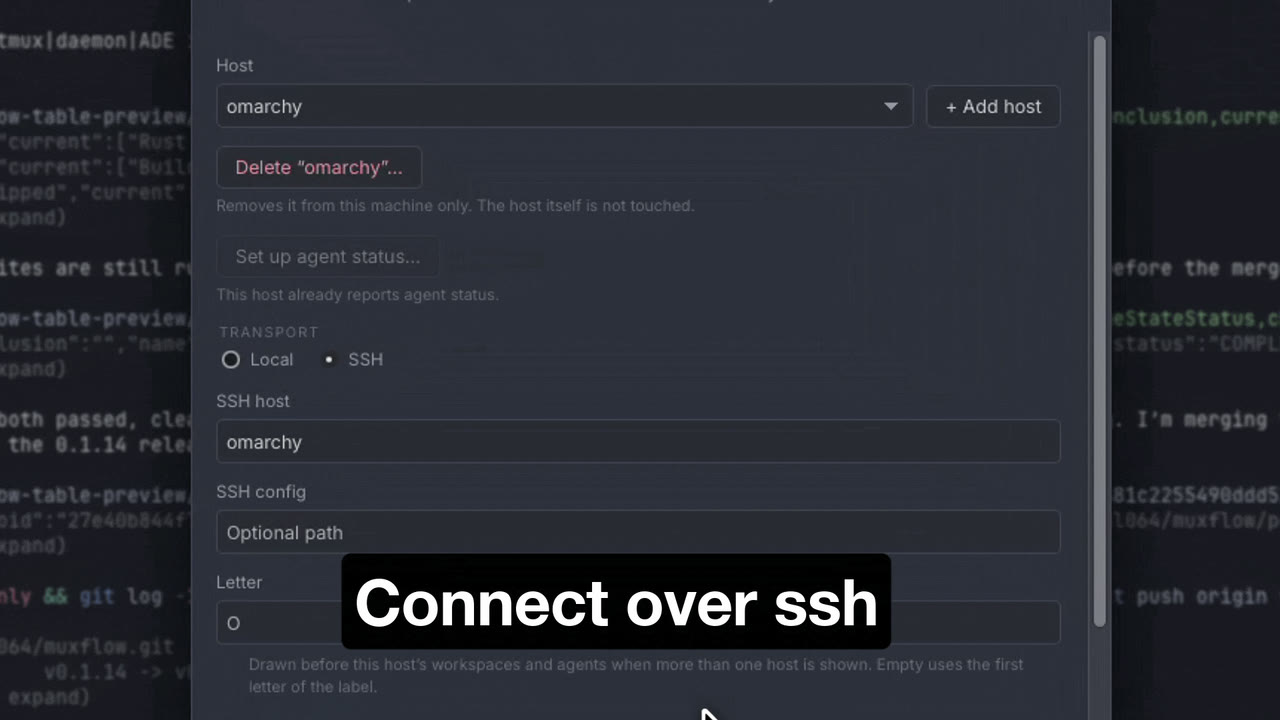
Connection settings with an SSH host

Paste over SSH

Copy a screenshot on your laptop and paste it into a remote pane. Claude Code and Codex see it as if it were local.

Files, Git, and Ports

Browse, edit, and download files on the host; diff, stage, commit, and push; forward a detected port with one click.

On your phone

Get told when an agent needs you, read its terminal and reply, or hold to talk and get the answer back as voice. Android today, iOS (coming soon).